Configure CI for React Native
Integrate Chromatic into your CI pipeline to get notified about any visual changes introduced by a pull request. Chromatic will run tests when you push code and report changes via the “UI Tests” badge for your pull request.
Configure CI with GitHub Actions
Here’s a sample GitHub Actions workflow (for Expo) that builds the Storybook app for iOS and Android in parallel, then runs Chromatic with the generated artifacts:
name: Build

on:
  pull_request:
    types: [opened, edited, synchronize]
  push:
    branches:
      - main

jobs:
  build-ios:
    runs-on: macos-latest
    steps:
      - name: Checkout
        uses: actions/checkout@v7
        with:
          fetch-depth: 0
      - name: Select Xcode
        run: sudo xcode-select -s /Applications/Xcode_26.3.app
      - name: Setup Node.js
        uses: actions/setup-node@v7
        with:
          node-version: 24.20.0
          cache: npm
      - name: Install dependencies
        run: npm ci
      - name: Cache CocoaPods spec repo
        uses: actions/cache@v6
        with:
          path: ~/.cocoapods
          key: cocoapods-specs-${{ hashFiles('package.json', 'app.json') }}
          restore-keys: |
            cocoapods-specs-
      - name: Cache Pods directory
        uses: actions/cache@v6
        with:
          path: ios/Pods
          key: ios-pods-${{ hashFiles('package.json', 'app.json') }}
          restore-keys: |
            ios-pods-
      - name: Build iOS
        run: npx --yes chromatic react-native-build --platform=ios --output-dir=build
      - name: Upload iOS build
        uses: actions/upload-artifact@v7
        with:
          name: ios-build
          path: build/
          retention-days: 1

  build-android:
    runs-on: ubuntu-latest
    steps:
      - name: Checkout
        uses: actions/checkout@v7
        with:
          fetch-depth: 0
      - name: Setup Node.js
        uses: actions/setup-node@v7
        with:
          node-version: 24.20.0
          cache: npm
      - name: Cache Gradle wrapper
        uses: actions/cache@v6
        with:
          path: ~/.gradle/wrapper
          key: gradle-wrapper-${{ hashFiles('package.json', 'app.json') }}
      - name: Cache Gradle dependencies
        uses: actions/cache@v6
        with:
          path: ~/.gradle/caches
          key: gradle-caches-${{ hashFiles('package.json', 'app.json') }}
          restore-keys: |
            gradle-caches-
      - name: Cache Android directory
        uses: actions/cache@v6
        with:
          path: android/
          key: android-dir-${{ hashFiles('package.json', 'app.json') }}
          restore-keys: |
            android-dir-
      - name: Install dependencies
        run: npm ci
      - name: Build Android
        run: npx --yes chromatic react-native-build --platform=android --output-dir=build
      - name: Upload Android build
        uses: actions/upload-artifact@v7
        with:
          name: android-build
          path: build/
          retention-days: 1

  chromatic:
    needs: [build-ios, build-android]
    runs-on: ubuntu-latest
    steps:
      - name: Checkout
        uses: actions/checkout@v7
        with:
          fetch-depth: 0
      - name: Setup Node.js
        uses: actions/setup-node@v7
        with:
          node-version: 24.20.0
          cache: npm
      - name: Install dependencies
        run: npm ci
      - name: Download iOS build
        uses: actions/download-artifact@v8
        with:
          name: ios-build
          path: build/ios
      - name: Download Android build
        uses: actions/download-artifact@v8
        with:
          name: android-build
          path: build/android
      - name: Move Storybook static files
        run: |
          mkdir -p storybook-static
          mv build/ios/storybook.app storybook-static/
          mv build/android/storybook.apk storybook-static/
      - name: Publish to Chromatic
        run: npx --yes chromatic -d storybook-static --exit-zero-on-changes --exit-zero-on-errors
        env:
          CHROMATIC_PROJECT_TOKEN: ${{ secrets.CHROMATIC_PROJECT_TOKEN }}
Configure CI with EAS Build
If you already build with EAS Build, you can build the Storybook artifacts on EAS instead of on GitHub-hosted runners, keeping your credentials and build profiles in one place.
This is a two-part setup: an EAS workflow builds the iOS .app and Android .apk artifacts in parallel, then triggers a GitHub Actions workflow that downloads them and runs Chromatic.
1. Add a Storybook build profile
Both platform builds use a dedicated storybook build profile so the artifacts contain Storybook instead of your app. In eas.json, enable Storybook in the bundle and produce artifacts Chromatic can install—an iOS Simulator build and an Android APK:
{
  "build": {
    "storybook": {
      "ios": {
        "simulator": true
      },
      "android": {
        "buildType": "apk"
      },
      "env": {
        "EXPO_PUBLIC_STORYBOOK_ENABLED": "true"
      }
    }
  }
}
2. Build artifacts and trigger the GitHub workflow
The EAS workflow builds both platforms, then uses the build IDs to trigger the Chromatic workflow on GitHub Actions via a repository dispatch.
name: Chromatic

on:
  push:
    branches: ['main']
  pull_request:
    branches: ['*']

jobs:
  build_ios:
    name: Build iOS Storybook
    type: build
    params:
      platform: ios
      profile: storybook
  build_android:
    name: Build Android Storybook
    type: build
    params:
      platform: android
      profile: storybook

  trigger_chromatic:
    name: Trigger Chromatic on GitHub Actions
    needs: [build_ios, build_android]
    steps:
      - name: Dispatch chromatic-eas workflow
        # 👇 Replace `<owner>/<repo>` with your repository.
        run: |
          curl --fail-with-body -sS -X POST \
            -H "Accept: application/vnd.github+json" \
            -H "Authorization: Bearer ${GH_DISPATCH_TOKEN}" \
            "https://api.github.com/repos/<owner>/<repo>/actions/workflows/chromatic-eas.yml/dispatches" \
            -d "{
              \"ref\": \"${{ github.ref_name || 'main' }}\",
              \"inputs\": {
                \"ios_build_id\": \"${{ needs.build_ios.outputs.build_id }}\",
                \"android_build_id\": \"${{ needs.build_android.outputs.build_id }}\"
              }
            }"
The build_ios and build_android jobs each expose a build_id output. The trigger_chromatic job passes those IDs to the GitHub workflow as inputs so it knows which artifacts to download.
GH_DISPATCH_TOKEN is a GitHub personal access token with workflow scope, both read and write. Store it as an EAS environment variable (marked secret) so the workflow can authenticate the dispatch request.
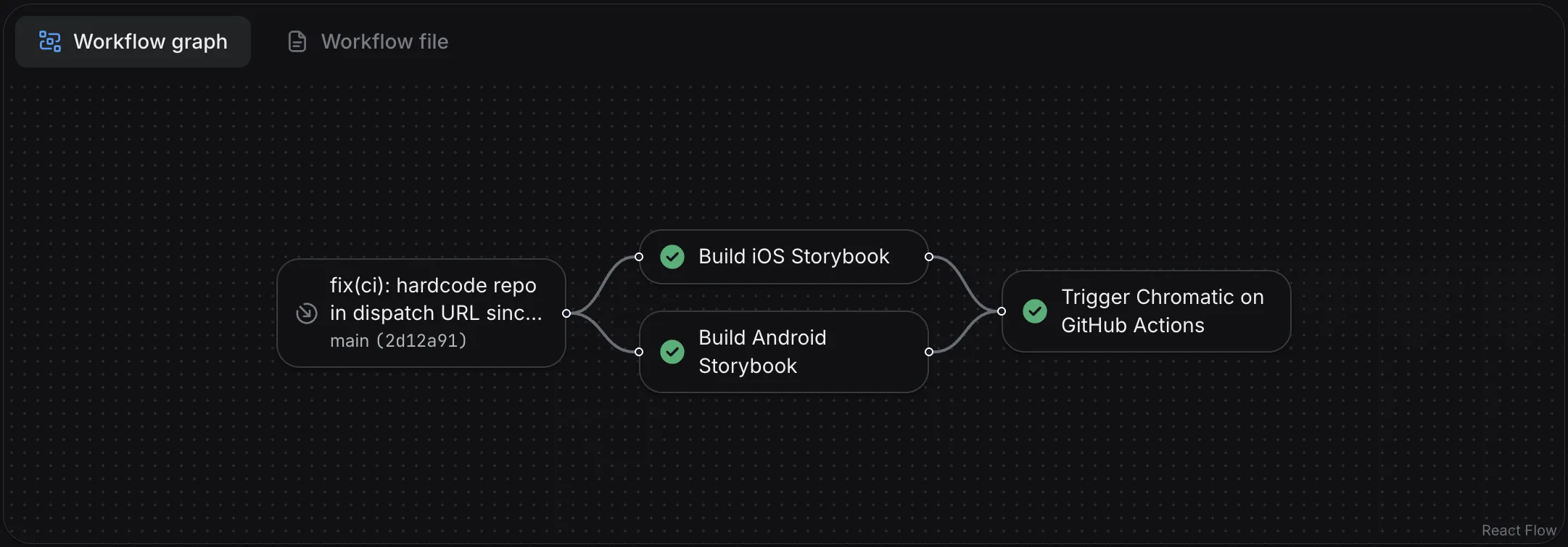
3. Run Chromatic on GitHub Actions
The dispatched workflow receives the two EAS build IDs, downloads the artifacts with the EAS CLI, arranges them into a storybook-static directory using the storybook.app / storybook.apk names Chromatic expects, and runs Chromatic with storybookBuildDir.
name: Chromatic (EAS artifacts)

on:
  workflow_dispatch:
    inputs:
      ios_build_id:
        description: 'EAS build ID for the iOS Storybook build'
        required: true
        type: string
      android_build_id:
        description: 'EAS build ID for the Android Storybook build'
        required: true
        type: string

jobs:
  chromatic:
    runs-on: ubuntu-latest
    steps:
      - name: Checkout
        uses: actions/checkout@v7
        with:
          fetch-depth: 0
      - name: Setup Node.js
        uses: actions/setup-node@v7
        with:
          node-version: 24.20.0
          cache: npm
      - name: Install dependencies
        run: npm ci
      - name: Download EAS build artifacts
        env:
          EXPO_TOKEN: ${{ secrets.EXPO_TOKEN }}
        run: |
          mkdir -p storybook-static
          IOS_PATH=$(npx eas-cli build:download --build-id "${{ inputs.ios_build_id }}" --non-interactive --json | jq -r '.path')
          cp -R "$IOS_PATH" storybook-static/storybook.app
          ANDROID_PATH=$(npx eas-cli build:download --build-id "${{ inputs.android_build_id }}" --non-interactive --json | jq -r '.path')
          cp "$ANDROID_PATH" storybook-static/storybook.apk
      - name: Run Chromatic
        uses: chromaui/action@latest
        with:
          projectToken: ${{ secrets.CHROMATIC_PROJECT_TOKEN }}
          storybookBuildDir: storybook-static
          exitZeroOnChanges: true
This workflow needs two secrets in your GitHub repository:
EXPO_TOKEN— an Expo access token so the EAS CLI can download your builds.CHROMATIC_PROJECT_TOKEN— your Chromatic project token.
Because the artifacts already contain both platforms, Chromatic skips the build step and snapshots directly from storybook.app and storybook.apk, just like the --storybook-build-dir flow.